- Aug 30, 2024
How to use Slack's Task List Feature to Optimize 3 Customer Success Workflows to Save You Time and Get Faster Results
- Diana
Our life in Customer Success just got a lot easier, thanks to Slack!
Did y’all see their latest release? Task Lists?
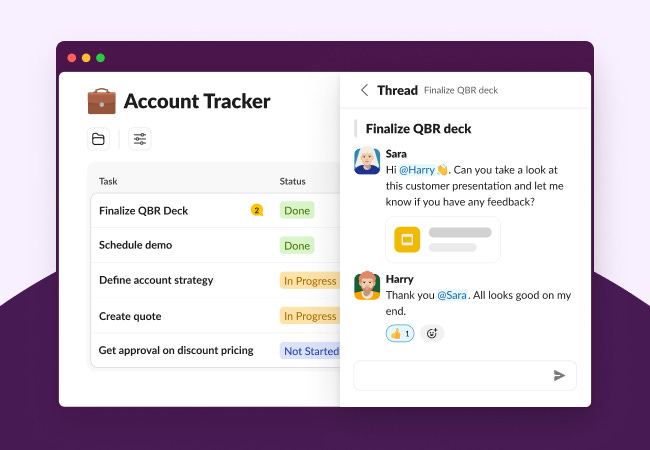
You can now manage projects and tasks directly from Slack using this feature!
This is great because right now, you’re likely switching between who knows how many tools, digging through folders and dashboards to find the right information, and then going back to Slack to find that message where someone talked about “next steps” on an account.
I’m exhausted from just writing that.
According to Slack’s State of Work report, 56% of knowledge workers report that switching between apps makes it harder to complete essential work, and 68% say that they spend 30 minutes per day switching between apps.
That’s why introducing functionality like Task Lists can be a game-changer in our daily work. In this post, I want to show you three ways you can use this new feature to optimize your internal operations, save time, communicate better, and get results faster.
Applying Task Lists To 3 CS Internal Processes
Onboarding A New Client
When a new client enters the onboarding process, a lot is on the line.
For newly established SaaS companies, fumbling their onboarding can see them facing churn rates of up to 15% within the first 12 months of operation.
Yikes!
But making onboarding a seamless experience for customers goes beyond a handoff call and fancy decks.
CS professionals often manage emails, spreadsheets, and multiple meetings to hand over accounts and coordinate onboarding tasks. There’s plenty of opportunity for missed steps and miscommunication.
After Slack
Moving onboarding communication and project management to Slack can reduce the reliance on the many tools, emails, and DMs that need to happen between teams like Sales, Onboarding, Support, and CSMs. This reduces the chances of errors, keeps everyone aligned, and speeds up the onboarding process.
The Set Up
Create a Project Channel:
Create a dedicated channel (e.g., #client-onboarding-clientname) and invite team members from Sales, Onboarding, Support, and CSM.
Set Up Task Lists:
Create a task list in the channel for onboarding activities.
Assign tasks like “Set up initial meeting,” “Provide access to tools,” and “Schedule training sessions” with due dates and responsible team members.
Use Workflow Builder:
Automate notifications for upcoming tasks and deadlines.
Trigger alerts to relevant teams when milestones are completed.
Oh, and if you’re worried about all of the documents shared being buried in the channels, there’s something else you can use in Slack... Canvas.
You can embed important files, videos, links, client contact information, to-do’s, and other relevant information in Canvas.
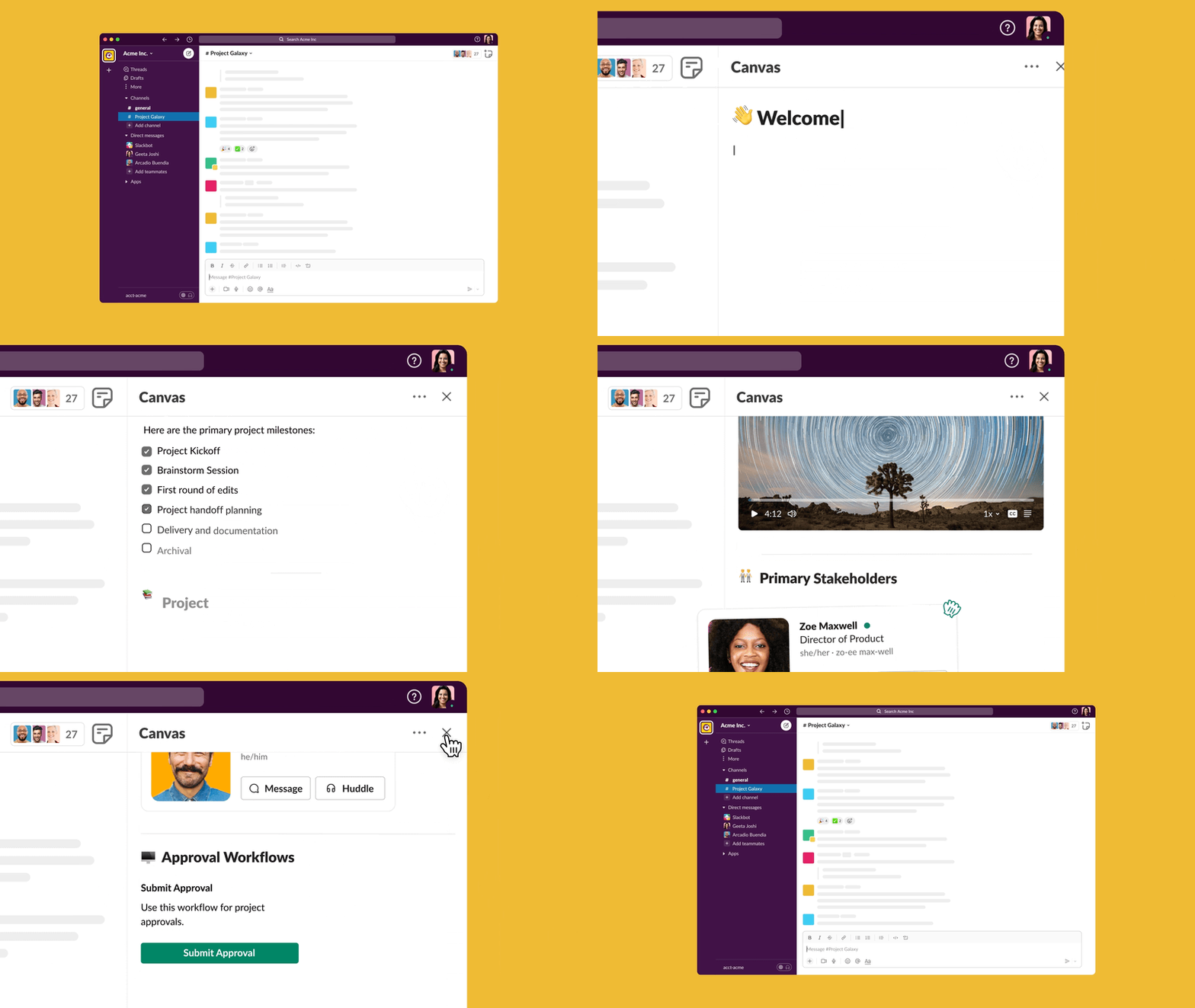
Slack Canvas in action!
Everything related to a client's onboarding – in a centralized place!
Risk Mitigation
I remember the very first churn risk I encountered as a CSM.
I thought I had to solve it all by myself – I was wrong.
When risk is identified, it’s a company effort to successfully retain that customer. Pulling in different internal stakeholders like leadership and technical experts may be necessary to game-plan the save.
However, internal coordination may occur through disjointed communication, such as ad hoc calls and emails, that don’t always reach all the people involved. This makes it hard to track progress and collaborate effectively.
After Slack
Dedicated channels and task lists allow for focused communication on risk factors and action plans involving all necessary stakeholders (without fragmented communication).
The Set Up
-
Create a Dedicated Channel:
Set up a channel (e.g., #risk-mitigation-clientname) to discuss churn risks and involve key stakeholders.
-
Add Tasks:
List tasks such as “Identify risk factors,” “Schedule meeting with the client,” and “Develop action plan.”
Assign these tasks to the appropriate team members.
-
Real-time Collaboration:
Use threads to discuss each task in detail, share updates, and document decisions.
Integrate with tools like Salesforce to sync client data and insights (even more optimization!).
Once you're done, you can write up the situation, steps taken, and outcomes to keep everyone in the loop.
Upselling Strategy Planning & Communication
On the flip side of risk, there are revenue opportunities – Yeeehaawww!
But just like the other workflows we’ve covered, upsell strategies usually suffer from a lack of coordination between Sales and CSM teams. The risk? Missed revenue and sometimes broken trust with client stakeholders.
After Slack
Having a centralized place to communicate, develop a value-driven plan, and execute the upsell opportunity can ensure everyone is on the same page.
The Set Up
-
Create a Strategy Channel:
Create a channel (e.g., #upsell-strategy-clientname) and include Sales and CSM teams.
-
Collaborative Task Lists:
Create a task list for upsell strategies, including tasks like “Identify potential upsell opportunities,” “Prepare presentation,” and “Schedule upsell meeting.”
Assign tasks to team members and set deadlines.
-
Workflow Automation:
Set up automated reminders for follow-ups and strategy sessions.
Use integrations with CRM tools to pull in client data for strategy planning.

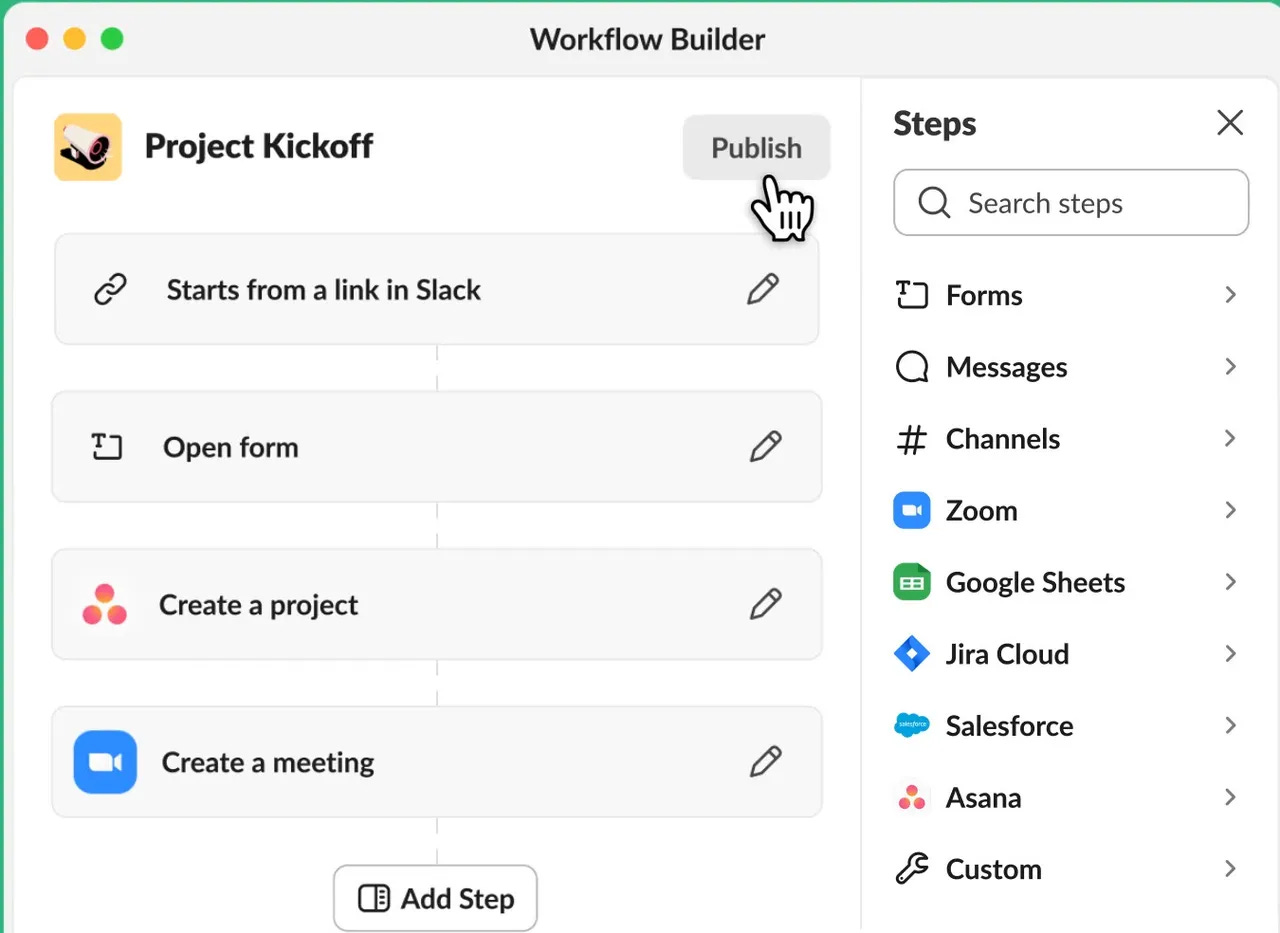
How Workflow Builder works in Slack
If we really think about it, there’s valuable data captured here 👀 this can all be turned into playbooks to train our team, help us produce consistent results, and forecast with more confidence.
Can It Be Measured?
Yup! Here’s how we specifically measure the workflows we covered today:
Onboarding Efficiency:
Time to Onboard: Track the average time it takes to complete the onboarding process for new clients before and after implementing Slack Task Lists. This can be measured by comparing timestamps on initial contact and project completion within a dedicated onboarding channel.
Task Completion Rates: Monitor the completion rate of tasks within onboarding workflows. A high completion rate indicates a smooth handover and reduces the risk of missed steps.
Risk Mitigation Success:
Reduced Churn Rate: Track your customer churn rate over time. Ideally, after implementing a more streamlined risk mitigation process with Slack, you should see a decrease in churn.
Resolution Time for Churn Risks: Measure the average time it takes to resolve a churn risk identified through a dedicated Slack channel. Faster resolution times indicate better communication and collaboration among stakeholders.
Upselling Revenue Growth:
Increased Upsell Conversion Rate: Track the percentage of identified upsell opportunities that convert into actual sales after implementing a collaborative upsell strategy channel with task lists.
Average Upsell Value: Monitor the average value of upsell deals closed after using Slack for upsell planning and communication. This can indicate the effectiveness of your upsell strategy discussions.
Newsletter
Weekly Newsletter With Actionable Insights
Gain the skills, knowledge, and confidence to succeed in Customer Success & Account Management: 0% theories, 100% actionable insights.